
Your first session
This walkthrough takes you from Spawn Town to a small protected shelter. Java and Bedrock players can follow the same steps.
1. Join and get ready
Section titled “1. Join and get ready”Follow the joining guide for your edition. You arrive beside the windmill in Spawn Town with iron tools, food, a white bed, a welcome book, and a travel compass. You receive the starter kit once. You also start with 500 crystals, the server’s currency.
To use a command in this guide, open the in-game chat, type it exactly as shown including the /, and send it. On a keyboard, press T to open chat; on a controller or touch screen, use your chat button. Replies appear in chat. You can reopen the welcome book with /guide.
The welcome screen offers a choice of biome (a type of landscape). Select Explore Spawn for now so you can choose your safety settings before leaving town.
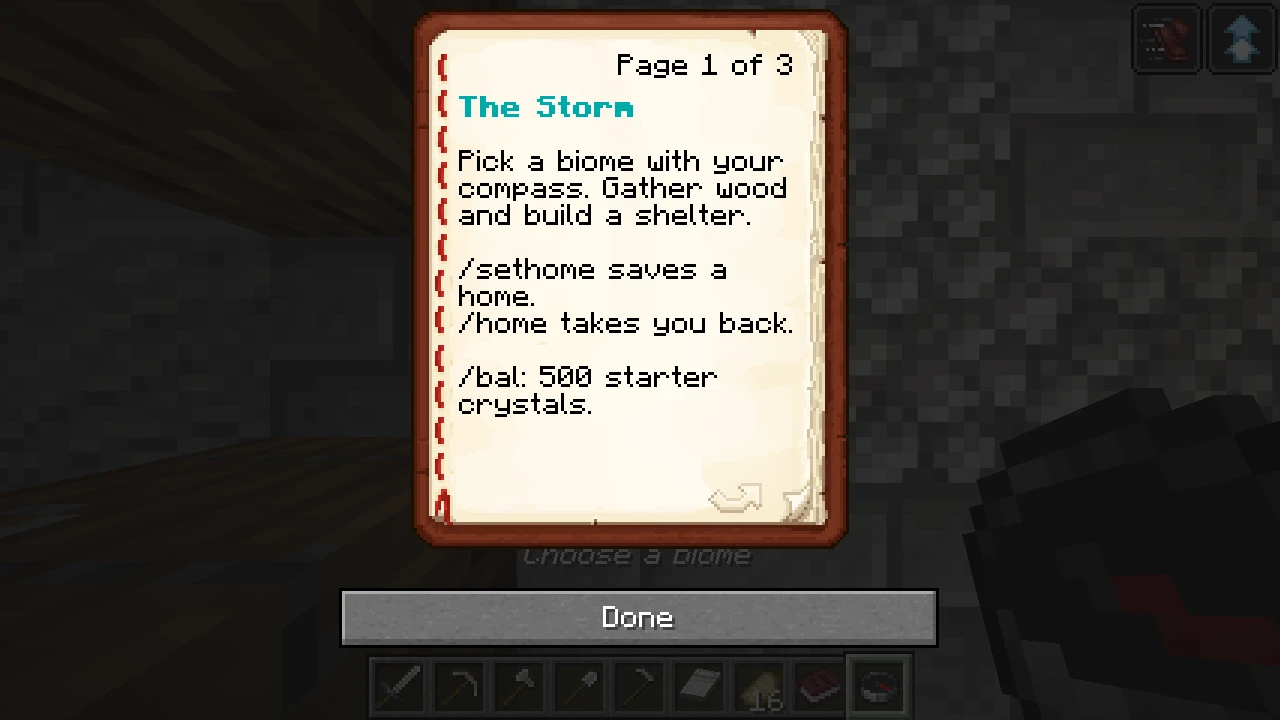
You can reopen this book at any time with /guide.
2. Choose your safety settings
Section titled “2. Choose your safety settings”Enter /rules and read the server rules. Player versus player combat (PvP) is disabled in Spawn Town but enabled outside it. If you do not want to fight other players, enter /pvp off before leaving. You can change this setting once a week. Monsters can still hurt you.
Do not damage other players’ builds or take their things. Unlocked containers are fair game where you have access; locked containers are protected. See PvP and safety and the rules for details.
3. Find a place
Section titled “3. Find a place”When you are ready to leave, select the compass in your hotbar and use it (right-click on a mouse, or use your device’s interact button) to choose a biome. You can instead enter /rtp for a random wilderness location in Frontier, the main survival world. The compass works until your first successful random teleport. Your compass trip is free; /rtp is free for your first seven days but has a cooldown. See travel for costs and returning to spawn.
Look for a place away from other people’s builds. Gather wood and choose somewhere to make a small shelter. Before building, stand there and enter /claim info. It reports who controls the chunk you are standing in: a 16-by-16-block column of the world. Wilderness is unclaimed, but an unclaimed build can still belong to someone. Build on your own land or with permission.
4. Protect your shelter
Section titled “4. Protect your shelter”A camp is a free group that can claim land for you and your friends. A claim protects a chunk from outsiders building, opening containers, or harming animals. It does not turn PvP off.
- Stand in the chunk where you want your shelter and enter
/camp create. - Enter
/claimwhile standing in that chunk. A successful reply says the chunk was claimed for your camp. - Enter
/claim infoin the same place. Check that the reply says the chunk belongs to your camp. If it says wilderness or names someone else, your shelter is not protected by your camp. Read the error in chat, find another suitable spot if needed, and try again. Ask in chat if you are stuck.
Now build your shelter and place your starter bed inside. Placing a bed can sometimes create a camp automatically, but check /claim info rather than assuming it did. A shelter may cross a chunk boundary, so check each chunk it occupies and claim any additional land you need. See camps and towns for expanding and inviting friends.
If no camp member comes online for 90 days, the camp and its claims are removed; your blocks and locks remain. A warning appears during the last 14 days.
5. Save a way back
Section titled “5. Save a way back”Stand at your shelter and enter /sethome to save your default home. Use your bed to set a separate bed respawn point. Enter /home to travel to your bed home if you have one, or your default home otherwise. To return to the default home explicitly, enter /home home. Home travel costs crystals and has a cooldown; /tpinfo shows your current price and readiness. See travel for details.
Craft and place a chest for your supplies. New containers lock automatically; look at the chest and enter /lock info to check it. See locks to learn how to share access.
You now have a shelter, a checked claim, and a way back. If you die, /graves lists your graves; their protection expires, so recover your belongings promptly.
Keep exploring
Section titled “Keep exploring”Use /spawn to return to the windmill and meet the townsfolk. Anna offers a daily reward, and /quests opens your quest journal. For ideas, see playing in a shared world. Ask in chat if you need help, use /help for commands, or contact staff with /ticket <what happened>. You can also join Discord.