
Worlds
Find a place to call home, explore a restored piece of server history, or visit the floating islands. Our survival worlds are permanent and do not reset.
Use /worlds to visit Frontier, Skylands, or Main Map 2, and /spawn to return to Spawn Town. Nether and End portals lead to their dimensions. You can explore them on the live map. Before building, check the land and respect existing work; see playing in a shared world.
Every border below is a circle centered at coordinates 0, 0. Measurements are radii.
Frontier
Section titled “Frontier”Our main survival world is a good place to start a home. Most players build here. Use /rtp, the welcome menu, the starter compass, or its /worlds entry to arrive at a random spot in the wilderness.
Round border, radius 7,000 blocks. Terrain inside the border is generated ahead of time.
Spawn (Main Map 1)
Section titled “Spawn (Main Map 1)”Visit the restored 2015 main world and Spawn Town with /spawn. Its historical towns are protected; /rtp world finds a spot outside them.
Round border, radius 7,000 blocks: the edge of the restored map.
Main Map 2
Section titled “Main Map 2”Explore the restored 2016 main world. Its historical towns are protected. Reach its spawn from /worlds, or find a random spot with /rtp map2.
Round border, radius 12,000 blocks: the edge of the restored map.
Skylands
Section titled “Skylands”Floating islands above the void, with modern biomes. Reach its spawn from /worlds, or find a random spot with /rtp skylands. Falling off an island is a long way down.
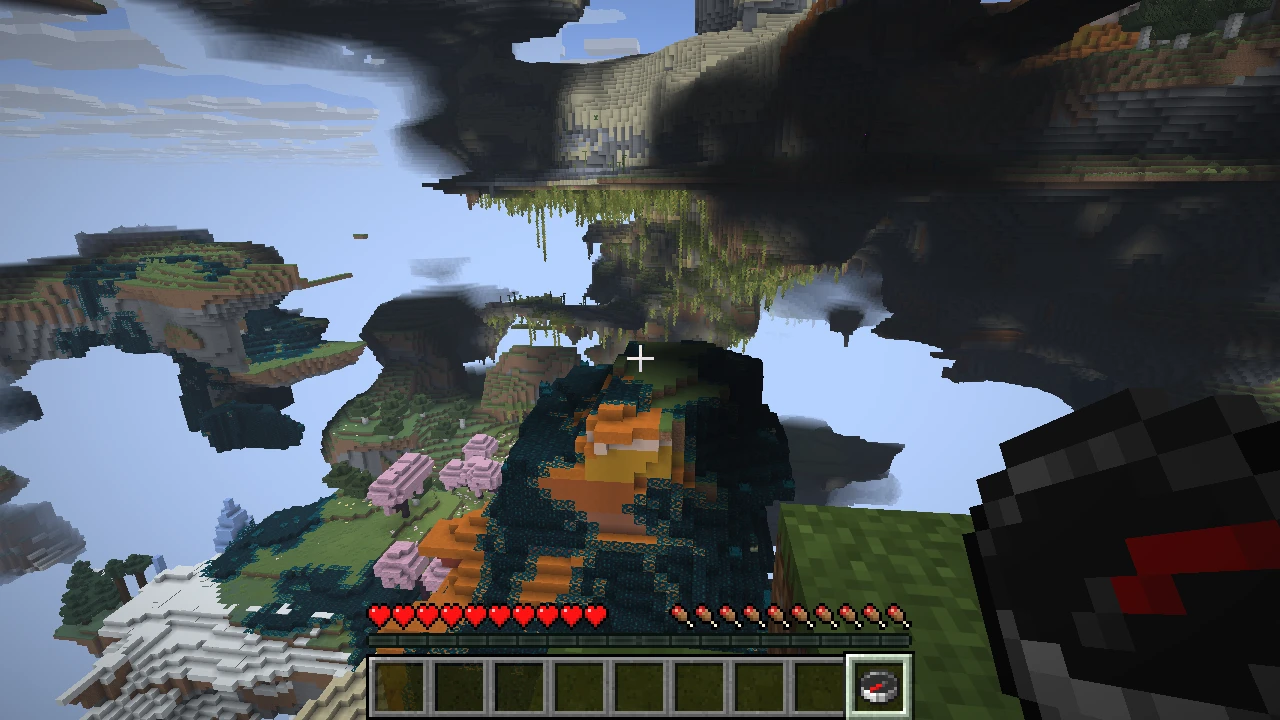
Round border, radius 3,000 blocks.
The Nether
Section titled “The Nether”Round border, radius 5,000 blocks.
The End
Section titled “The End”Round border, radius 1,750 blocks.